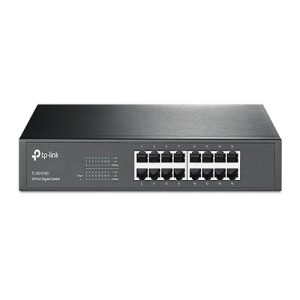
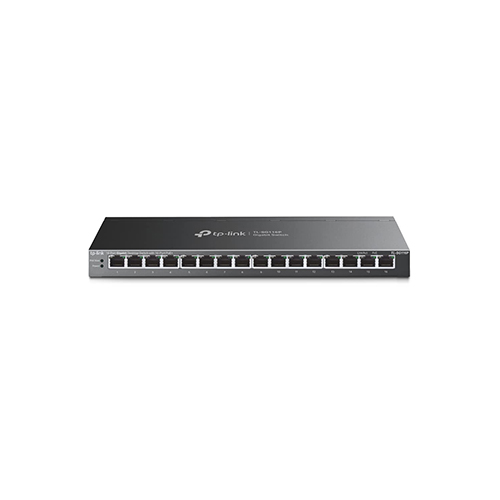
TP-Link TL-SG116P 16-Port Gigabit Desktop Switch with 16-Port PoE+ Price in Dubai UAE
- 120 W PoE Budget : 16 × 802.3af/at-compliant PoE+ ports with a total power supply of 120 W*.
- Gigabit Ethernet Ports: 16 x gigabit PoE+ RJ45 ports provide high-speed connections.
- Extended Distance Transmission: Up to 250 m data and power transmission range under Extend Mode**
- Priority Mode: Priority Mode ensures high priority of ports 1–4 to guarantee the quality of the sensitive applications
- Isolation Mode: Isolation Mode allows one-click client traffic separation for higher security and performance.
- PoE Auto Recovery: Automatically reboots your dropped or unresponsive PoE-powered devices with PoE Auto Recovery
- Plug and Play: Plug and play with no configuration required .
Enquire on Whatsapp
Description
| ategory | Feature | Specification |
|---|---|---|
| Hardware Features | Interface | 16× 10/100/1000Mbps RJ45 Ports, AUTO Negotiation, AUTO MDI/MDIX |
| Network Media | 10BASE-T: UTP cat. 3, 4, 5 (max 100m); 100BASE-TX: UTP cat. 5, 5e (max 100m); 1000BASE-T: UTP cat. 5, 5e, 6 (max 100m) | |
| Fan Quantity | Fanless | |
| External Power Supply | External Power Adapter (Output: 53.5 VDC / 2.43 A) | |
| Packet Forwarding Rate | 23.8 Mpps | |
| PoE Ports (RJ45) | Standard: 802.3af/at compliant, Ports 1–16, Power Supply: 120 W | |
| MAC Address Table | 8K, Auto-learning, Auto-aging | |
| Switching Capacity | 32 Gbps | |
| Dimensions (W x D x H) | 11.3 × 4.4 × 1.0 in (286 × 111.7 × 25.4 mm) | |
| Max Power Consumption | 11.72 W (220 V / 50 Hz no PD connected), 142.51 W (with 120 W PD connected) | |
| Max Heat Dissipation | 39.85 BTU/h (no PD connected), 484.53 BTU/h (with 120 W PD connected) | |
| Software Features | Advanced Features | Compatible with IEEE 802.3af/at compliant PDs, Extend Mode (Ports 1–4), Priority Mode (Ports 1–4), Isolation Mode (Ports 1–7 / 8-14), PoE Auto Recovery (Ports 1-16), MAC Address Auto-Learning and Auto-Aging, IEEE 802.3x Flow Control, 802.1p/DSCP QoS, IGMP Snooping |
| Transfer Method | Store-And-Forward | |
| Others | Certification | FCC, CE, RoHS |
| Package Contents | TL-SG116P, Power Adapter, Installation Guide | |
| Environment | Operating Temp: 0–40 ℃ (32–104 ℉), Storage Temp: -40–70 ℃ (-40–158 ℉), Operating Humidity: 10–90% RH non-condensing, Storage Humidity: 5–90% RH non-condensing |